MacFamilyTree 7.6 (760002) [MAS + iCloud] [Intel] - Family tree
movies, software, shows...
Files
| MacFamilyTree 7.6.dmg | 250.65 MB |
Description
Apple » Apple Macintosh » Другие программы (Mac OS)
MacFamilyTree
Год выпуска: 12 августа 2015
Версия: 7.6 (760002)
Разработчик: Synium Software GmbH
Платформа: PPC / Intel
Язык интерфейса: Мультиязычный (Русский присутствует)
Таблетка: Вылечено
Системные требования:
• OS X 10.7.5 или более поздняя версия.
• Любой 64-разрядный Intel ® Mac.
Описание: Программа позволяет пользователю создавать семейное древо и отображать его несколькими способами. Инструменты, используемые при работе с семейным древом: внесение данных по каждому члену семьи, внесение данных по семьям, виртуальное дерево, семейный ассистент, диаграмма потомков и предков, веерная диаграмма, шкала времени, виртуальный глобус, семейная диаграмма, генограмма, медиатека, отчёты о персонах в дереве. Программа позволяет импортировать данные в формате GEDCOM с кодировкой UTF либо в формате ANSI. Программа позволяет экспортировать данные в HTML-стандарт.
[spoiler="Процедура установки:"]
• Смонтироать образ
• Перетащить иконку приложения в папку Программы
[/spoiler]
[spoiler="Новое в версии 7.6"]
• Enhanced Source Management
• Add notes to every individual source citation
• Revamped options to assign source evidence, information and quality
• Improved person and family event lists to display if source citations are available
• Better display of source citations
• Improved overview of citations when viewing a source
• Copy & Paste for source citations
• Improved source selection view when adding sources to entries
• New Person Analysis Report
• Displays interesting facts about your family tree, for example which persons have the same occupation or eye color
• 18 data sources for person facts and events
• New Fractal Ancestor Chart
• Compact chart showing all ancestors of a person
• Printable and configurable
• Further Improvements
• Greatly enhanced performance of person, family, source and place edit sections
• Automatically assign place, county, state and country names when searching for coordinates of places
• Compatibility to the upcoming new version of OS X
• Improved sorting and display of dates before christ
[/spoiler]
[spoiler="История обновлений"]
[spoiler="В версии 7.5.3"]
• Several issues creating family books fixed
• Localization issues corrected
• Sorting in the media report fixed
• FamilySearch matches are now displayed correctly
• Crash issue when editing persons resolved
[/spoiler]
В версии 7.5
• Genealogy Book Creation and Printing
• Create complete genealogy books of your family tree
• Lots of different styles and templates
• Export as PDF file or print it out on your printer
• Auto-create books highlighting a person, family or your complete database
• Much improved Place management
• Add Media, Notes and Labels to places
• Apple Maps integration: Places are directly displayed on a map when editing
• FamilySearch Record Hints
• Directly view historical documents from within MacFamilyTree (birth, death certificates, census information etc)
• Add historical documents as sources to your persons
• Added support for Apples brand new Photos App
• Improved Map view when editing persons & families & events
• New all-textual styles for all reports
• All charts & diagrams can be displayed and exported in 15 languages
• Support for multiple numbering systems & person identifiers (AFN, RIN etc)
• New Anniversary Report
• New Map Report
• Improved Fan Chart
• To Do management improved
• Interactive Tree improvements (Add brothers & sisters with a single clicks, more enhancements)
В версии 7.3.4
• Основные вопросы, касающиеся импорта GEDCOM
• Улучшенный поиск дубликатов
В версии 7.3.3
• Issue uploading persons to FamilySearch corrected
В версии 7.3.2
• Stability improvements using FamilySearch integration
• Issue displaying the correct name format resolved
• Stability issue when adding photos from iPhoto resolved
• Further smaller bugs fixed
В версии 7.3.1
• graphical glitch displaying charts corrected
• localization issues corrected
• m4a audio files can now be added to the database
• other smaller fixes
В версии 7.2.3
• Preparation for FamilySearch Private Spaces
В версии 7.2.2
• Fixed upload issues to FamilySearch
• Person context option in the edit section works correctly now
• Issues exporting PDF files fixed
• Several smaller issues generating reports fixed
В версии 7.2.1
• Fixed issue preventing login to MacFamilyTree.com for some users
В версии 7.2
MAJOR UPDATE 7.2 - New Reports - New Interactive Tree - Improved FamilySearch
Completely rewritten Reports
• All reports have been rewritten from the ground up
• Select report styles from lots of available presets
• All reports can be displayed and exported in 16 languages
• Choose custom watermarks, ornaments and borders for reports
• New Descendancy Report
• Much improved printing of reports
• Improved PDF generation of reports
• Paginated preview of the reports for printout
• Rewritten narrative report including „text to speech“
• Adjustable font scale for all reports
Improved Interactive Tree
• Zoom the Interactive Tree for better overview and navigation
• Improved user interface for better readability
• Much improved performance
• Display more generations simultaneously
Improved FamilySearch integration
• Completely redesigned FamilySearch overview pane
• Completely rewritten results list
• Improved performance when scanning for matches on FamilySearch
• Better detection of updated persons on FamilySearch including better change log
• Improved discovery of further online information on FamilySearch
• Faster scanning for matches and further information
Other
• Refined user interface
• Improved search function in the person list sidebar
• New startup window
• Major performance enhancements in all edit sections
• Better scrolling behaviour when using a third-party mouse
[/spoiler]
[spoiler="Невозможно запустить программу из-за повреждения"]
Читаем внимательно Gatekeeper
Коротко:
Откройте Системные настройки > Защита и безопасность > Общие, и сделайте как на скрине.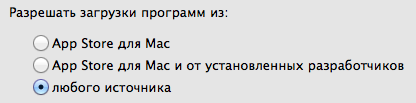
[/spoiler]
[spoiler="Скриншот окна About"]
[/spoiler]
[spoiler="Скриншоты"]


[/spoiler]
Related Torrents
| torrent name | size | uploader | age | seed | leech |
|---|---|---|---|---|---|
| 264.72 MB | Doktor S. | 11 years | 4 | 0 | |
| 250.79 MB | Doktor S. | 11 years | 3 | 0 | |
| 225.48 MB | Doktor S. | 11 years | 3 | 0 | |
| 169.39 MB | Doktor S. | 13 years | 4 | 0 |
All Comments