Udemy - Photoshop 2020 MasterClass [Eng - Ita sub]
movies, software, shows...
Files
| 1. Adjustment Layers Chapter Introduction.mp4 | 24.8 MB | ||
| 1. Adjustment Layers Chapter Introduction.srt | 716 B | ||
| 1. Basics Chapter Introduction.mp4 | 51.7 MB | ||
| 1. Basics Chapter Introduction.srt | 1.5 KB | ||
| 1. Chapter Introduction.mp4 | 16.7 MB | ||
| 1. Chapter Introduction.srt | 614 B | ||
| 1. Content-Aware Fill Workspace.mp4 | 108.7 MB | ||
| 1. Content-Aware Fill Workspace.srt | 8.1 KB | ||
| 1. Drawing Chapter Introduction.mp4 | 24.8 MB | ||
| 1. Drawing Chapter Introduction.srt | 716 B | ||
| 1. Layers Chapter Introduction.mp4 | 24 MB | ||
| 1. Layers Chapter Introduction.srt | 819 B | ||
| 1. Masking Chapter Introduction.mp4 | 16.6 MB | ||
| 1. Masking Chapter Introduction.srt | 1.2 KB | ||
| 1. Object Selection Tool.mp4 | 107.8 MB | ||
| 1. Object Selection Tool.srt | 8.7 KB | ||
| 1. Prepare for the Adobe Certified Associate exam.mp4 | 22.4 MB | ||
| 1. Prepare for the Adobe Certified Associate exam.srt | 11.9 KB | ||
| 1. Retouching Chapter Introduction.mp4 | 40.6 MB | ||
| 1. Retouching Chapter Introduction.srt | 1.4 KB | ||
| 1. Selections Chapter Introduction.mp4 | 39.4 MB | ||
| 1. Selections Chapter Introduction.srt | 1.5 KB | ||
| 1. Smart Objects Chapter Introduction.mp4 | 40.6 MB | ||
| 1. Smart Objects Chapter Introduction.srt | 1.3 KB | ||
| 1. Transformations Chapter Introduction.mp4 | 15.8 MB | ||
| 1. Transformations Chapter Introduction.srt | 614 B | ||
| 1. Type Chapter Introduction.mp4 | 32.7 MB | ||
| 1. Type Chapter Introduction.srt | 716 B | ||
| 1. Variable and SVG Fonts.mp4 | 14.6 MB | ||
| 1. Variable and SVG Fonts.srt | 7.2 KB | ||
| 1. Why learn Photoshop.mp4 | 15.4 MB | ||
| 1. Why learn Photoshop.srt | 3.4 KB | ||
| 1. Workflows Chapter Introduction.mp4 | 29.5 MB | ||
| 1. Workflows Chapter Introduction.srt | 1 KB | ||
| 10. Portrait Retouching project Part 3.mp4 | 23.7 MB | ||
| 10. Portrait Retouching project Part 3.srt | 8.2 KB | ||
| 10. Timesavers.mp4 | 43.1 MB | ||
| 10. Timesavers.srt | 4.2 KB | ||
| 11. Photo Restoration project.mp4 | 66.8 MB | ||
| 11. Photo Restoration project.srt | 19.3 KB | ||
| 12. Advanced Clone Stamp Tool Techniques.mp4 | 133.7 MB | ||
| 12. Advanced Clone Stamp Tool Techniques.srt | 17.7 KB | ||
| 2. Adjustment Layers Essentials.mp4 | 34.2 MB | ||
| 2. Adjustment Layers Essentials.srt | 14 KB | ||
| 2. Bridge Integration.mp4 | 30.8 MB | ||
| 2. Bridge Integration.srt | 10.3 KB | ||
| 2. Brush Tool Essentials.mp4 | 57.8 MB | ||
| 2. Brush Tool Essentials.srt | 24.6 KB | ||
| 2. Build Your Portfolio.mp4 | 58 MB | ||
| 2. Build Your Portfolio.srt | 7 KB | ||
| 2. Enhanced Warp.mp4 | 41.5 MB | ||
| 2. Enhanced Warp.srt | 4.4 KB | ||
| 2. Healing Brushes.mp4 | 82.1 MB | ||
| 2. Healing Brushes.srt | 19.4 KB | ||
| 2. How to study from this course.mp4 | 7.7 MB | ||
| 2. How to study from this course.srt | 4.4 KB | ||
| 2. Layers Essentials.mp4 | 84.9 MB | ||
| 2. Layers Essentials.srt | 20.6 KB | ||
| 2. Non-destructive Workflow.mp4 | 205.1 MB | ||
| 2. Non-destructive Workflow.srt | 34.6 KB | ||
| 2. Painting Improvements.mp4 | 124.2 MB | ||
| 2. Painting Improvements.srt | 9.2 KB | ||
| 2. Saving Your Work.mp4 | 39.7 MB | ||
| 2. Saving Your Work.srt | 12.5 KB | ||
| 2. Selections Essentials.mp4 | 65.9 MB | ||
| 2. Selections Essentials.srt | 22.7 KB | ||
| 2. Smart Objects Essentials.mp4 | 52.2 MB | ||
| 2. Smart Objects Essentials.srt | 12.4 KB | ||
| 2. Timeline Panel.mp4 | 188.9 MB | ||
| 2. Timeline Panel.srt | 16.9 KB | ||
| 2. Tranformations Essentials.mp4 | 76.4 MB | ||
| 2. Tranformations Essentials.srt | 21.7 KB | ||
| 2. Updated Brushes panel.mp4 | 11.4 MB | ||
| 2. Updated Brushes panel.srt | 3.9 KB | ||
| 2. Working with Images.mp4 | 42.8 MB | ||
| 2. Working with Images.srt | 13.5 KB | ||
| 2. Working with Text.mp4 | 86.4 MB | ||
| 2. Working with Text.srt | 20.6 KB | ||
| 3. 3D Layers.mp4 | 157.1 MB | ||
| 3. 3D Layers.srt | 20.4 KB | ||
| 3. Adobe Camera RAW.mp4 | 26.9 MB | ||
| 3. Adobe Camera RAW.srt | 7 KB | ||
| 3. Brush Smoothing.mp4 | 18.1 MB | ||
| 3. Brush Smoothing.srt | 8.5 KB | ||
| 3. Clone Stamp Tool Essentials Part 1.mp4 | 42.2 MB | ||
| 3. Clone Stamp Tool Essentials Part 1.srt | 16.2 KB | ||
| 3. Creating Custom Brushes.mp4 | 66.5 MB | ||
| 3. Creating Custom Brushes.srt | 20.4 KB | ||
| 3. Creating Print-ready PDFs.mp4 | 44.6 MB | ||
| 3. Creating Print-ready PDFs.srt | 17.5 KB | ||
| 3. Formatting Text.mp4 | 46 MB | ||
| 3. Formatting Text.srt | 14.5 KB | ||
| 3. Frame Tool.mp4 | 240.4 MB | ||
| 3. Frame Tool.srt | 21.1 KB | ||
| 3. Free Transform Improvements.mp4 | 41.7 MB | ||
| 3. Free Transform Improvements.srt | 4.2 KB | ||
| 3. Getting an Adobe Certification.mp4 | 10 MB | ||
| 3. Getting an Adobe Certification.srt | 6.3 KB | ||
| 3. Layers panel.mp4 | 55.7 MB | ||
| 3. Layers panel.srt | 15.2 KB | ||
| 3. Pixel Masks.mp4 | 139.6 MB | ||
| 3. Pixel Masks.srt | 21.3 KB | ||
| 3. Selections based on color and contrast Part 1.mp4 | 48.9 MB | ||
| 3. Selections based on color and contrast Part 1.srt | 18.1 KB | ||
| 3. Special Transformations.mp4 | 54.4 MB | ||
| 3. Special Transformations.srt | 14.5 KB | ||
| 3. Tonal Adjustments.mp4 | 79.6 MB | ||
| 3. Tonal Adjustments.srt | 22.1 KB | ||
| 3. User Interface.mp4 | 29.7 MB | ||
| 3. User Interface.srt | 15.5 KB | ||
| 3. Vector Smart Objects.mp4 | 48.5 MB | ||
| 3. Vector Smart Objects.srt | 10.2 KB | ||
| 4. Clone Stamp Tool Essentials Part 2.mp4 | 43.4 MB | ||
| 4. Clone Stamp Tool Essentials Part 2.srt | 15.7 KB | ||
| 4. Color Adjustments.mp4 | 85.1 MB | ||
| 4. Color Adjustments.srt | 27.2 KB | ||
| 4. Convert Smart Objects to Layers.mp4 | 15.2 MB | ||
| 4. Convert Smart Objects to Layers.srt | 1.7 KB | ||
| 4. Creative Techniques with Text.mp4 | 72.4 MB | ||
| 4. Creative Techniques with Text.srt | 25.8 KB | ||
| 4. Lightroom Integration.mp4 | 83.7 MB | ||
| 4. Lightroom Integration.srt | 14.2 KB | ||
| 4. Linked Smart Objects.mp4 | 66.4 MB | ||
| 4. Linked Smart Objects.srt | 15.7 KB | ||
| 4. Navigation.mp4 | 130.5 MB | ||
| 4. Navigation.srt | 12.2 KB | ||
| 4. Saving Files for the Web.mp4 | 31.9 MB | ||
| 4. Saving Files for the Web.srt | 11.2 KB | ||
| 4. Selections based on color and contrast Part 2.mp4 | 49.8 MB | ||
| 4. Selections based on color and contrast Part 2.srt | 15.9 KB | ||
| 4. Special Layers.mp4 | 41.2 MB | ||
| 4. Special Layers.srt | 18.8 KB | ||
| 4. Symmetrical Painting.mp4 | 11.7 MB | ||
| 4. Symmetrical Painting.srt | 2.6 KB | ||
| 4. Updated behaviours.mp4 | 174.5 MB | ||
| 4. Updated behaviours.srt | 13.3 KB | ||
| 4. Vector Masks for Geometric Shapes.mp4 | 70 MB | ||
| 4. Vector Masks for Geometric Shapes.srt | 14.9 KB | ||
| 4. Vector Shapes.mp4 | 51.3 MB | ||
| 4. Vector Shapes.srt | 24.2 KB | ||
| 5. Advanced Selection Techniques.mp4 | 55.4 MB | ||
| 5. Advanced Selection Techniques.srt | 18 KB | ||
| 5. Contrast Adjustments.mp4 | 65.3 MB | ||
| 5. Contrast Adjustments.srt | 13.6 KB | ||
| 5. Curvature Tool.mp4 | 17.7 MB | ||
| 5. Curvature Tool.srt | 6.3 KB | ||
| 5. Image Size and Resolution.mp4 | 29.4 MB | ||
| 5. Image Size and Resolution.srt | 10.5 KB | ||
| 5. Layer Styles.mp4 | 22.9 MB | ||
| 5. Layer Styles.srt | 9.9 KB | ||
| 5. Liquify Filter.mp4 | 76.5 MB | ||
| 5. Liquify Filter.srt | 15.5 KB | ||
| 5. Properties Panel Updates.mp4 | 47.5 MB | ||
| 5. Properties Panel Updates.srt | 4.9 KB | ||
| 5. Smart Filters.mp4 | 101 MB | ||
| 5. Smart Filters.srt | 22.9 KB | ||
| 5. User Experience Design.mp4 | 15.9 MB | ||
| 5. User Experience Design.srt | 5.4 KB | ||
| 5. Vector Masks for Organic Shapes.mp4 | 50.8 MB | ||
| 5. Vector Masks for Organic Shapes.srt | 9.1 KB | ||
| 6. Blend Modes.mp4 | 40.2 MB | ||
| 6. Blend Modes.srt | 10 KB | ||
| 6. Complex Selection Project.mp4 | 61.4 MB | ||
| 6. Complex Selection Project.srt | 22.6 KB | ||
| 6. Content-aware Techniques.mp4 | 72.2 MB | ||
| 6. Content-aware Techniques.srt | 18.4 KB | ||
| 6. Cropping Images.mp4 | 62.1 MB | ||
| 6. Cropping Images.srt | 13.9 KB | ||
| 6. New Preset Panels.mp4 | 47.3 MB | ||
| 6. New Preset Panels.srt | 5.3 KB | ||
| 6. Photoshop Mobile Apps.mp4 | 56.5 MB | ||
| 6. Photoshop Mobile Apps.srt | 18.9 KB | ||
| 6. Select & Mask.mp4 | 8.6 MB | ||
| 6. Select & Mask.srt | 4.4 KB | ||
| 7. Color Modes.mp4 | 22.8 MB | ||
| 7. Color Modes.srt | 7.5 KB | ||
| 7. Dodge and Burn Tools.mp4 | 60.1 MB | ||
| 7. Dodge and Burn Tools.srt | 20.8 KB | ||
| 7. Improved Upscaling with Preserve Details 2.0.mp4 | 14.9 MB | ||
| 7. Improved Upscaling with Preserve Details 2.0.srt | 5.9 KB | ||
| 7. Lens Blur Updates.mp4 | 52.4 MB | ||
| 7. Lens Blur Updates.srt | 5 KB | ||
| 8. Auto Sampling for Content-Aware Fill.mp4 | 20.6 MB | ||
| 8. Auto Sampling for Content-Aware Fill.srt | 1.7 KB | ||
| 8. General Improvements.mp4 | 12 MB | ||
| 8. General Improvements.srt | 5.4 KB | ||
| 8. Portrait Retouching project Part 1.mp4 | 35.8 MB | ||
| 8. Portrait Retouching project Part 1.srt | 11.5 KB | ||
| 9. Cloud Documents.mp4 | 24.4 MB | ||
| 9. Cloud Documents.srt | 2.3 KB | ||
| 9. Conclusion.mp4 | 9.6 MB | ||
| 9. Conclusion.srt | 921 B | ||
| 9. Portrait Retouching project Part 2.mp4 | 43.2 MB | ||
| 9. Portrait Retouching project Part 2.srt | 14.1 KB | ||
| ▲ 196 total files | |||
Description
Udemy - Photoshop 2020 MasterClass [Eng - Sub Ita] 
Thx to the Original Uploader
What will you learn
-Learn all the different kind of Selection techniques
-Master Masking to be able to seamlessly combine images together
-Learn how to retouch photos like a pro
-Understand the differences and pros/cons between different image file formats
-Learn useful keyboard shortcuts and best practices
-Learn Photoshop from the very beginning the way a professional would use it
Description
One of Udemy’s highest rated Photoshop courses – by one of the Top 10 Adobe Instructors in the world – this course teaches you to use this industry-leading image editing application as a creative professional. The whole course content, including examples, techniques, exercises and quizzes have been carefully selected and refined to offer the most efficient and enjoyable way to master Adobe Photoshop.
This course has been purposely designed for users of all experiences, from complete beginners to existing Photoshop users, who want to take their skills to the next level. Being able to confidently work in Photoshop is an essential skill for any Photographer or Graphic Designer, but it is an equally useful tool for Retouchers, UI/UX designers, Web Developers, Digital Artists and various other areas within and outside of the creative industry.
‘One of the best courses on Udemy I've taken. It covers both the topic at hand and also how to get certified in it - all in a format that's relaxing and enjoyable. The instructor is impressive. Very knowledgeable man.’
Joe Pillera
More about Adobe Photoshop:
If you can think it, you can make it with Photoshop CC, the world’s best imaging and graphic design software. Create and enhance photographs, illustrations and 3D artwork. Design websites and mobile apps. Edit videos, simulate real-life paintings and more. It’s everything you need to make any idea real.
A closer look at what you will learn:
First of we will start with the basics, so you feel totally at ease with the interface, navigation, preferences, setting up new documents and applying simple adjustments to images.
The next chapter will teach you everything you need to know about one of the most crucial features in Photoshop, working with Layers.
Moving on you will learn about all the drawing tools and techniques, focusing on creating and working with Brushes and Vector Shapes.
The following chapters will walk you through core skills that are essential to work non-destructively in Photoshop: Transformations, Selections, Masking, Smart Objects and Adjustment Layers.
The next chapter is all about retouching techniques. You will learn the difference between technical and creative image retouching and all the features and techniques professionals use for enhancing images for adverts, movie posters and the beauty industry.
You will also learn about all the different types of image files, the pros and cons of each of them and how to work with the robust Adobe Camera RAW editor.
There is also a whole chapter dedicated to working with type in Photoshop, which can be extremely important when working on adverts and posters.
The final two chapters will ensure you understand how to save and export your work and learn more advanced Photoshop workflows including 3D Layers, the Timeline panel, Lightroom integration and so much more.
This course includes:
-94 Videos (12 hours of total playtime)
-Interactive quizzes testing what you learnt in each chapter
-Downloadable working files
-Course content updated with the latest CC 2020 new features
-All future updates to Photoshop will be included in this course for no extra payment
-Estimated completion time: 25 hours (including finishing all exercises and quizzes)
-Preparation guide for the official Adobe Certified Associate exam: Visual design using Photoshop
-Completion certificate upon finishing the entire course
Martin is an Adobe Certified Instructor – voted as one of the Top 10 Adobe instructors in the world – with years of experience teaching in classrooms, seminars and webinars. He also worked professionally in the creative industry for over 10 years on a wide range of projects for clients such as Disney, Accenture, Mattel, etc.
Who will find it useful:
-Perfect for anyone looking to start or develop their career in the creative industry.
-Complete beginners will be able to master the software from the very beginning to the most advanced features.
-Self-taught users and existing professionals can use the course to take their skills and knowledge to the next level, refine their workflows and learn to do everything the right way!
-Existing and more experienced users of Photoshop may also discover hidden gems and workflows or catch up with all the new features released in CC 2020.
‘This course is not only educational but also really entertaining. I'm honestly really glad I bought this course. I'm loving it and honestly from these videos you can really tell that Photoshop is this guy's true passion. I'm ready to be a pro!!!!!’
Anna
Skills you will gain:
-Creating photo montages and combining images in various creative ways.
-Retouching photographs like a professional, seamlessly removing or adding any details.
-Enhancing tonal values, color, contrast, sharpness, clarity, reducing noise and compression artifacts in images.
-Exporting to various image formats for both print and screen with confidence.
-Designing engaging compositions using photos, typography and special effects.
-Creating digital art with the powerful Brush engine and using blend modes.
Are you ready to become a Photoshop pro? Enroll on this course now and get started!
Who is this course for:
This course is aimed at anyone who wants to get into the creative industry and gain a rock solid foundation of Photoshop. Although it is providing a beginner to intermediate level learning experience it can be useful for experienced Photoshop users too as there are many self-taught users who are missing out on a lot of techniques and features.
Requirements
*Any version of Adobe Photoshop, preferably not older than Photoshop CS6. Ideally Photoshop CC (Creative Cloud).
*Prior knowledge is not needed
*Exercise Files and Study Guides are provided
The course consists of 
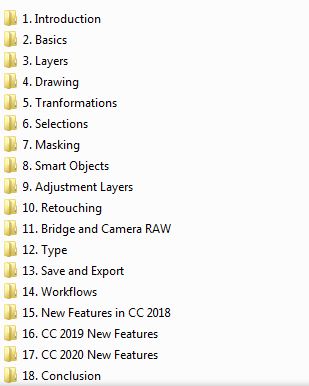
*Test and Screenshots by JackieALF
Related Torrents
| torrent name | size | uploader | age | seed | leech |
|---|---|---|---|---|---|
| 13.93 GB | JackieALF333 | 6 years | 2 | 2 | |
| 3.8 GB | BELFA | 8 years | 0 | 0 | |
|
UDEMY ADOBE PHOTOSHOP CC FOR BEGINNERS MAIN FEATURES OF PHOTOSHOP TUTORIAL - [tptorrents] Posted by
twistedpc in Apps
> Windows
|
232 MB | twistedpc | 9 years | 0 | 0 |
All Comments